
MEPCO Online Bill Check 2026 – View, Download and Print Duplicate Bill
Checking your electricity bill online is a convenient way to find your latest payable amount, due date, and electricity consumption without waiting for a paper bill. With MEPCO Online Bill services, consumers can view their current bill and save or print a duplicate copy using information from a previous electricity bill.
MEPCO stands for Multan Electric Power Company and supplies electricity to consumers in South Punjab. If your monthly bill has not arrived, you have misplaced it, or you want to check the amount before making a payment, you can use the official online bill portal.
In this guide, you will learn how to check your MEPCO bill online, download a duplicate bill, print a copy, find your reference number, and troubleshoot common problems.
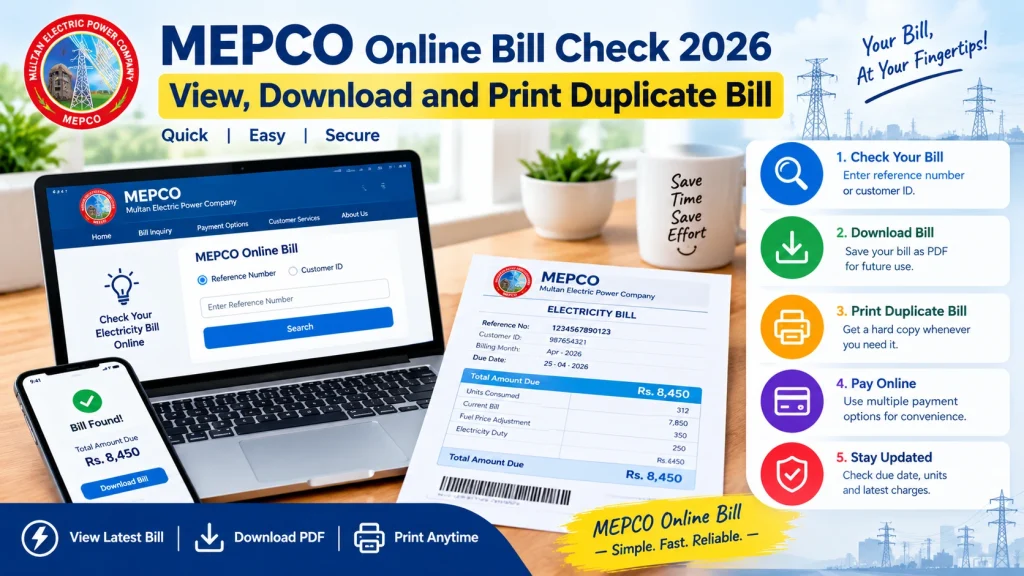
How to Check MEPCO Online Bill in 2026
You can check your latest electricity bill through the official MEPCO bill portal. Keep a previous bill nearby because you will need your reference number or Customer ID.
Follow these steps:
- Open the official MEPCO bill-checking page.
- Select the Reference Number option, or choose Customer ID if that is the information you have.
- Enter the requested number carefully as printed on your previous bill.
- Complete any additional verification requested by the portal.
- Click the Search button.
- Wait for your latest bill details to appear.
- Review the billing month, total amount, units consumed, and due date.
Once the bill appears, you can use your browser’s print option to print it or save a digital copy. Checking the bill online lets you review your charges before making a payment.
How to Download a MEPCO Duplicate Bill
A duplicate bill is an additional copy of your electricity bill. It is useful when the original paper bill has been lost, damaged, or delivered late.
To download your MEPCO duplicate bill, open the official bill portal and retrieve your latest bill using the reference number or Customer ID. After the bill loads, look for a download option if available. Otherwise, use your browser’s print function and select Save as PDF as the destination.
On a computer:
- Open your bill in the browser.
- Press Ctrl + P on Windows.
- Select Save as PDF in the printer destination options.
- Check the page preview and choose the required pages.
- Click Save and select a folder for your file.
On a mobile phone, open the browser menu and choose Print or Share, depending on your device. Select Save as PDF if your phone offers that option.
Keep the downloaded copy somewhere easy to access so you can check the amount and due date again when needed.
How to Print Your MEPCO Electricity Bill
If you need a paper copy, you can print the bill after opening it online.
First, retrieve the current bill from the official portal. Next, open the print dialog using your browser menu or the keyboard shortcut Ctrl + P. Select your connected printer, confirm the paper size and preview, and then click Print.
If you do not own a printer, save the bill as a PDF and take the file to a printing shop.
Before printing, verify that the bill belongs to your electricity connection. Check the consumer details, billing month, and amount payable to avoid printing the wrong document.
Where to Find Your MEPCO Reference Number
The reference number identifies the electricity connection used to retrieve your bill online. You can usually find it in the consumer details section near the top of a previous MEPCO bill.
The online portal requests a 14-digit reference number. Enter the digits carefully and follow the portal’s instructions for any additional selection, such as the connection category. If you have a Customer ID instead, check whether the portal supports searching with that number.
If you have lost all your previous bills, contact a MEPCO customer service centre for help identifying your connection. Do not guess the number, as incorrect details may prevent the bill from appearing.
What Information Does a MEPCO Bill Show?
After you retrieve your MEPCO Online Bill, review the information before paying. Your bill may include the following details:
- Consumer details: Information identifying the electricity connection.
- Billing month: The period for which the bill has been issued.
- Units consumed: Electricity usage recorded for the billing period.
- Meter reading: Reading information used to calculate consumption.
- Amount payable: The current charges and any applicable outstanding balance.
- Due date: The deadline for paying the amount without the applicable late-payment surcharge.
- Taxes and adjustments: Applicable taxes, duties, surcharges, or other billing adjustments.
The exact amount depends on your consumption, applicable tariff, taxes, adjustments, and any outstanding balance. If something looks incorrect, compare the bill with your meter reading and previous bills before contacting MEPCO.
What to Do If Your MEPCO Bill Is Not Showing Online
Sometimes a bill may not appear immediately. This does not necessarily mean your connection has a problem. Try these troubleshooting steps.
1. Check Your Reference Number
Review the number on your previous bill and enter it again. Even one incorrect digit can prevent the portal from finding your connection.
2. Try the Customer ID Option
If the portal provides a Customer ID search option, try using the ID printed on your bill instead of the reference number.
3. Check Again Later
The online portal may be temporarily unavailable or slow. Wait a little while and try again.
4. Confirm the Latest Bill Has Been Issued
If the current month’s bill is not available yet, check again later. The availability of a bill depends on the billing cycle and when the record is updated.
5. Contact MEPCO Customer Support
If the bill remains unavailable, contact MEPCO through its official website or customer service channels. Keep your previous bill or connection details ready to help staff identify the issue.
How to Check Your MEPCO Bill Due Date and Amount
When your bill appears online, look for the amount payable within the due date and the due date itself. Some bills also display a higher amount payable after the due date if a late-payment surcharge applies.
Pay attention to the payment deadline instead of relying on an estimate from a previous month. Due dates and payable amounts can change from one billing cycle to another.
If you notice an unexpected balance, compare the current bill with your previous payment receipt. An unpaid balance, adjustment, or delayed payment record may affect the total shown.
How to Pay Your MEPCO Bill Online
After checking your bill, you can explore the available payment methods. Depending on your bank and service provider, options may include mobile banking, internet banking, an authorized payment app, an ATM, or a bank branch.
For safer payment:
- Confirm that the bill reference and amount match your electricity connection.
- Open your bank’s official app or an authorized payment service.
- Select the electricity bill payment option and choose MEPCO where required.
- Enter the requested reference number or other billing details.
- Review the displayed amount before confirming payment.
- Save the transaction receipt or confirmation number.
Payment options and processing times can vary. If the payment succeeds but the bill still appears unpaid, keep your receipt and contact the payment provider or MEPCO for confirmation. Avoid paying a second time until you have checked the transaction status.
Official MEPCO Website and Customer Support
For reliable billing information, use the official MEPCO website and its linked bill-checking services. The official duplicate-bill facility and customer service centres can help consumers who cannot access their bill online.
For billing errors, incorrect meter readings, or unexplained charges, contact your relevant MEPCO customer service centre. Explain the issue and provide the necessary bill details or payment evidence. MEPCO’s website also provides customer service information and guidance on common billing problems.
Remember that MEPCOOnlineBill.xyz is the website where you are reading this guide; it should not be described as MEPCO’s official website unless the company confirms that relationship. Use the official portal for your bill record and verify contact details through MEPCO’s own website.
Frequently Asked Questions
1. How can I check my MEPCO Online Bill?
Visit the official MEPCO bill portal, enter your reference number or Customer ID as supported by the page, and submit the search. Your available bill details should appear on screen.
2. Can I download my MEPCO duplicate bill for free?
You can retrieve the bill through the official online portal and save it as a PDF using your browser’s print feature. The portal provides access to the bill; printing costs may apply if you use a commercial printing shop.
3. Can I print my MEPCO bill without the original paper copy?
Yes. If you have the required reference number or Customer ID, you can retrieve the bill online and print the displayed copy.
4. What should I do if my MEPCO bill is not available?
Check your entered details, try the alternative search option if available, and check again later. If the issue continues, contact MEPCO customer support.
5. How do I find my MEPCO bill due date?
Open your latest bill and look for the printed due date and amount payable within that date. Always use the current bill rather than assuming the previous month’s deadline still applies.
6. Is MEPCOOnlineBill.xyz the official MEPCO website?
Do not assume that it is an official company website. For the official bill record, use the MEPCO bill portal and visit MEPCO’s official website for company information.
Conclusion
Checking your MEPCO Online Bill is a simple way to stay informed about your electricity charges, payment deadline, and monthly consumption. With your previous bill’s reference number or Customer ID, you can retrieve the latest available bill, save a PDF copy, or print a duplicate when needed.
Always review the consumer details, payable amount, and due date before making a payment. If your bill does not appear or you notice an incorrect charge, use the official MEPCO website and customer service channels for assistance. Keeping a digital copy of each bill and its payment receipt can also make future billing checks easier.