MEPCO Bill Due Date Check – How to Find Your Payment Deadline
Paying your electricity bill before the deadline helps you manage household expenses and avoid late-payment problems. With MEPCO Bill Due Date Check, consumers can find the payment deadline on their latest electricity bill, review the amount payable, and plan their payments on time.
Multan Electric Power Company (MEPCO) supplies electricity to consumers across several areas of southern Punjab, Pakistan. If you live in a MEPCO service area, checking your latest bill online can help you find the due date without waiting for a paper copy.
In this guide, you will learn how to check your MEPCO bill due date online, find the deadline on a printed bill, download a duplicate bill, pay through available channels, and handle a missed payment deadline.
What Is MEPCO Bill Due Date Check?
MEPCO Bill Due Date Check is the process of finding the last date by which you should pay your electricity bill. The due date is normally printed on your monthly bill alongside the billing period and amount payable.
Knowing your payment deadline helps you:
- Avoid missing the payment date.
- Plan your monthly electricity expenses.
- Check the amount you need to pay.
- Arrange payment if your paper bill arrives late.
- Keep track of outstanding bills and payment receipts.
The due date can vary from one billing cycle to another. Always check the date printed on your latest bill rather than assuming it will be the same every month.
How to Check MEPCO Bill Due Date Online
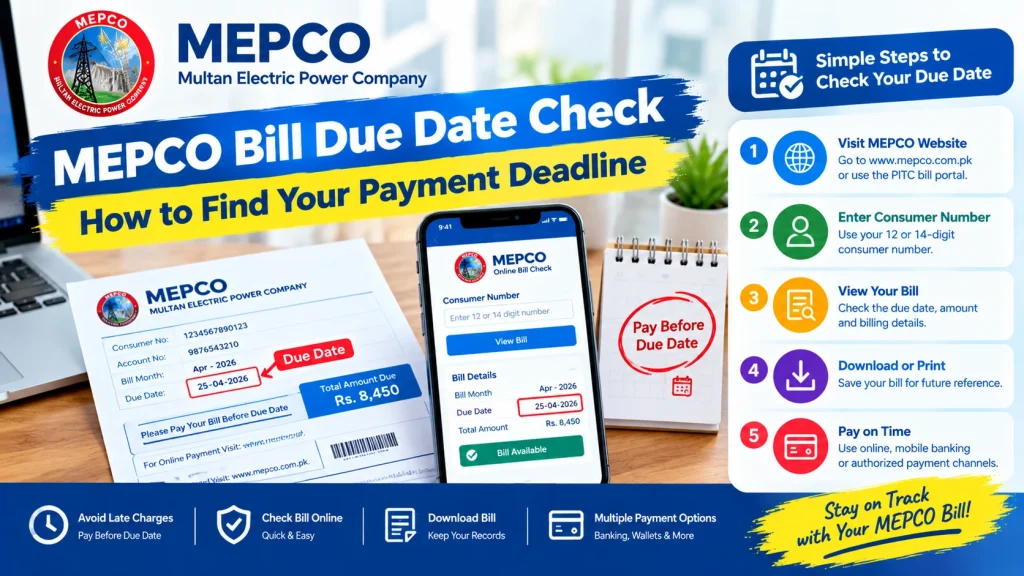
You can check your latest MEPCO bill through an appropriate online bill service. Follow these steps to find your payment deadline.
Step 1: Open the MEPCO Bill Checking Service
Visit the official MEPCO website or use the PITC electricity bill portal, which provides electricity bill services for participating distribution companies.
Make sure you select MEPCO if the portal asks you to choose your electricity provider.
Step 2: Find Your Reference Number
Locate your 14-digit reference number on a previous MEPCO electricity bill. It is used to identify your connection when checking your bill online.
Enter the number carefully, including all digits. Do not confuse it with your meter number or another account identifier.
Step 3: Submit Your Bill Details
Enter your reference number in the relevant field and follow the instructions shown on the bill-checking page. If the service offers a Customer ID option, use the details requested by that service.
Submit the information to retrieve your available bill.
Step 4: Locate the Due Date
When your bill appears, look for the field labelled Due Date, Payment Due Date, or similar wording.
Review the billing month, total payable amount, and deadline. If the bill includes a payment amount or instructions for a period after the original due date, check those details before making a payment.
Step 5: Save or Print Your Bill
If the service offers a print or download option, save a copy of your bill as a PDF. You can use this copy to review the deadline or keep a record for future reference.
Remember that online availability and page features may vary. If your bill does not appear, check your reference number and try again later.
How to Find the Due Date on a Printed MEPCO Bill
If you already have a paper bill, you do not necessarily need to check it online.
Follow these steps:
- Take your latest MEPCO electricity bill.
- Look for the billing information section.
- Find the printed Due Date field.
- Check the total amount payable next to the billing details.
- Note the deadline on your calendar or phone.
- Keep the bill until the payment has been completed and recorded.
Always use the due date on your latest bill. An older bill may show a deadline that has already passed.
How to Check MEPCO Due Date Without a Paper Bill
Sometimes your electricity bill may not arrive on time, or you may accidentally misplace it. You can still try to retrieve your billing information online.
Use Your Previous Bill
If you have a photograph or saved PDF of an earlier bill, use its reference number to access the relevant bill-checking service.
Check the Online Bill Portal
Open the PITC bill portal and select the appropriate electricity provider. Enter your reference number to look for your latest available bill.
Contact MEPCO for Assistance
If the online service does not display your bill, contact MEPCO through its official customer service channels. Keep your reference number and any previous billing details ready.
Do not assume that a missing paper bill means you do not owe a payment. Check your latest available bill and confirm the payment deadline.
How to Pay Your MEPCO Bill Before the Due Date
Once you know your payment deadline, choose a payment method that is convenient and available to you.
1. Mobile Banking
Many Pakistani banks provide utility bill payment services through their mobile apps.
To pay:
- Open your bank’s official app.
- Sign in securely.
- Open the utility bill payment section.
- Select MEPCO if available.
- Enter your reference number or follow the app’s instructions.
- Verify the account details and payable amount.
- Confirm the transaction and save the receipt.
2. Internet Banking
If your bank supports online utility payments, sign in to its official website and follow the bill payment instructions. Verify the electricity company and amount before submitting the payment.
3. ATM
Some banks allow customers to pay utility bills through their ATMs. Check whether your bank supports MEPCO payments and follow the on-screen instructions.
4. Authorized Payment Channels
You may also use authorized payment services, bank branches, or other channels listed by your bank or electricity provider.
Payment options can vary by provider. Always check the available services and keep your transaction confirmation.
What Happens If You Miss the MEPCO Bill Due Date?
If you miss your payment deadline, the bill may become overdue and additional charges may apply according to the applicable billing rules.
Here is what you should do:
- Check the outstanding amount: Review the latest bill or payment instructions.
- Look for applicable late charges: Your bill may show a revised amount or information about late payment.
- Pay through an authorized channel: Verify the amount before completing the transaction.
- Keep the receipt: Save your transaction ID or payment confirmation.
- Check your payment status: If the bill continues to appear unpaid, contact your bank or MEPCO with proof of payment.
An overdue bill can also lead to further collection action under the applicable rules. Do not rely on the original due date alone if the payment deadline has already passed.
The exact additional amount and applicable conditions depend on the bill and current rules. Check the amount displayed by an authorized payment service or contact MEPCO if anything is unclear.
How to Avoid Missing Your MEPCO Payment Deadline
A simple monthly routine can help you avoid forgetting your electricity bill.
Set a Phone Reminder
Create a recurring reminder to check your bill when it becomes available. Set another reminder a few days before the printed deadline.
Check Your Bill Every Month
Do not assume your monthly due date will remain unchanged. Review each new bill as soon as it becomes available.
Use Online Banking Carefully
If you pay through a banking app, verify the account details, amount, and payment confirmation. A payment instruction is not proof that the transaction succeeded.
Save Digital Copies
Keep a folder of your electricity bills and payment receipts. Naming files by month and year makes it easier to locate old records.
Verify Payments Early
Avoid waiting until the final hours before the deadline. If a transaction fails or the payment service is unavailable, you will have more time to use another authorized channel.
Common Problems When Checking the MEPCO Bill Due Date
The Online Bill Does Not Appear
Check that you entered the correct reference number and selected MEPCO. You can try again later if the service is temporarily unavailable.
The Due Date Is Missing or Unclear
Review the full bill rather than relying on a partial screenshot. If the date remains unclear, contact MEPCO through an official support channel.
The Payment Has Been Made but the Bill Shows Unpaid
Keep your transaction receipt and confirm the payment status with the bank or payment provider. Contact MEPCO if the amount is not reflected after the relevant processing period.
The Original Due Date Has Passed
Check the latest outstanding amount and any revised payment instructions before paying. Do not assume that the original amount is still the final payable amount.
Frequently Asked Questions
1. How can I check my MEPCO bill due date online?
Open an appropriate electricity bill portal, select MEPCO if required, and enter your 14-digit reference number. Check the due date displayed on the available bill.
2. Can I check my MEPCO due date using my reference number?
Yes. Your reference number is commonly used to retrieve your electricity bill through an online bill-checking service.
3. What if I do not receive my MEPCO bill?
Try checking your bill online using your reference number. If the latest bill is unavailable, contact MEPCO for assistance.
4. Can I pay my MEPCO bill after the due date?
You may be able to pay an overdue bill through an authorized channel. Check the latest payable amount and any applicable late charges before completing the transaction.
5. How do I know if my MEPCO bill payment was successful?
Check the confirmation shown by your bank or payment provider and save the receipt. If your bill still appears unpaid, use the transaction details to follow up.
6. Does the MEPCO bill due date remain the same every month?
Not necessarily. Always check the due date printed on each new bill.
7. Where can I check my latest MEPCO bill?
Start with the official MEPCO website or the PITC electricity bill portal. Make sure you use the correct electricity provider and reference number.
Conclusion
MEPCO Bill Due Date Check helps electricity consumers find their payment deadline, review the latest payable amount, and plan payments before the deadline. You can check the date on your printed bill or retrieve available billing information online using your reference number.
To avoid payment problems, check your bill every month, use authorized payment channels, and save your transaction receipts. If your deadline has passed or your payment status is unclear, review the latest bill and contact MEPCO for guidance.