MEPCO Bill Payment Through ATM – Step-by-Step Instructions
Paying your electricity bill on time helps you avoid late-payment charges and service issues. MEPCO Bill payments can often be made through supported bank ATMs, depending on the bank and its available bill-payment services. This guide explains how to pay your bill through an ATM, what information to prepare, and how to confirm your transaction.
What Is MEPCO Bill Payment Through ATM?
MEPCO stands for Multan Electric Power Company, which supplies electricity to many areas of southern Punjab, Pakistan. ATM bill payment allows customers to pay eligible electricity bills using a bank card and a participating bank’s ATM.
The exact menu options may differ between banks. Before starting, check whether your bank supports MEPCO or electricity bill payments through its ATM network.
Requirements Before Paying Your MEPCO Bill
Keep these items ready before visiting an ATM:
- An active debit or ATM card.
- Your card PIN.
- A current electricity bill or its reference number.
- Sufficient funds in your bank account.
- Access to an ATM that offers utility bill payment.
Check the reference number carefully. Entering an incorrect number could display another account or prevent the payment from proceeding.
How to Pay MEPCO Bill Through ATM
Follow these general steps. The wording and order of the ATM menus can vary by bank.
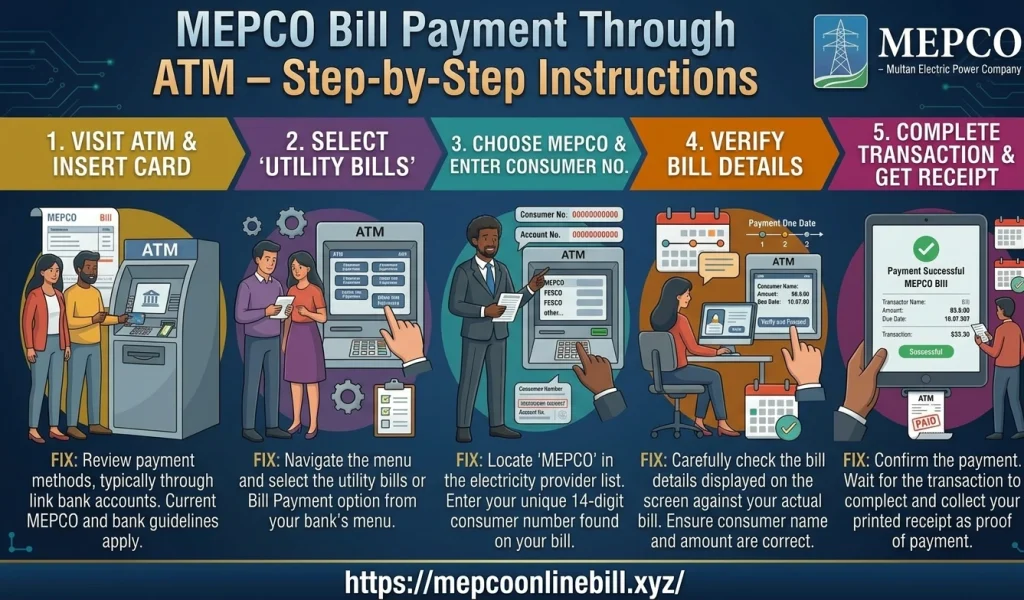
Step 1: Visit a Supported Bank ATM
Use an ATM belonging to your bank or another supported network that offers utility bill payments. Check the screen for bill-payment services before continuing.
Step 2: Insert Your ATM Card
Insert your debit card into the machine. Select your preferred language if prompted, then enter your PIN privately. Never share your PIN with anyone.
Step 3: Select Bill Payment
Look for an option such as Bill Payment, Utility Bills, or Payments. Some ATMs place these services under a separate payments menu.
Step 4: Choose the Electricity Provider
Select the electricity category and look for MEPCO in the available list. If MEPCO is not listed, your ATM may not support this payment service.
Step 5: Enter Your Reference Number
Enter the reference number printed on your electricity bill. Review the digits before continuing to avoid selecting the wrong account.
Step 6: Verify the Bill Details
If the ATM displays billing information, compare the account details and payable amount with your bill. If the information is incorrect or unclear, cancel the transaction and verify the reference number.
Step 7: Confirm and Complete Payment
Follow the on-screen instructions to authorize the payment. Wait for the transaction result before leaving the machine. Collect the receipt if one is issued.
How to Confirm Your MEPCO Bill Payment
After completing a transaction, keep the ATM receipt or transaction reference number. Check your bank account for the debit and retain the record until the payment is reflected in the billing system.
If the amount is deducted but the payment status is unclear, do not immediately pay again. Contact your bank using its official customer-support channel and ask for the transaction status. You can also check the bill through the relevant official billing service.
Common ATM Payment Problems and Solutions
MEPCO is not listed: The ATM may not support this biller. Try a supported banking app, internet banking, or another authorized payment channel.
Incorrect reference number: Recheck the digits printed on your bill. Avoid repeatedly entering an unverified number.
Transaction declined: Check your available balance and whether your card is active. Contact your bank if the problem continues.
Money deducted but no receipt: Record the transaction time and amount, then contact your bank to request confirmation.
Payment not updated: Allow time for processing and keep your receipt. If the bill remains unpaid, contact the bank and relevant billing support before making another payment.
Safety Tips for ATM Bill Payments
Protect your bank details whenever you pay a utility bill.
- Cover the keypad while entering your PIN.
- Never disclose your PIN, password, or one-time password.
- Use official bank channels and familiar ATMs.
- Check the biller and amount before confirming.
- Keep receipts until the payment is confirmed.
- Avoid asking strangers to handle your card or enter your PIN.
For additional billing information, visit the official MEPCO website or check the PITC MEPCO bill portal, where available services may help you access your billing details.
Frequently Asked Questions
Can I pay my MEPCO bill through any ATM?
No. The ATM must support utility bill payments and list MEPCO as an available biller. Services vary by bank.
Do I need my printed electricity bill?
A printed bill is useful because it contains your reference number. Some banks may offer other ways to select a bill account, but requirements vary.
What should I do if my payment fails?
Check your bank account and transaction status first. If money was deducted, contact the bank before attempting another payment.
Is ATM bill payment available 24 hours a day?
An ATM may be accessible at any time, but payment services can be affected by bank maintenance, network availability, or processing schedules.
Conclusion
MEPCO Bill PAYMENT THROUGH AN ATM can be a convenient option when your bank supports the service. Prepare your reference number, verify the displayed details, follow the ATM instructions, and save your transaction receipt. If a payment fails or remains unconfirmed, contact your bank and verify the status before paying again.